Data Flow Animation
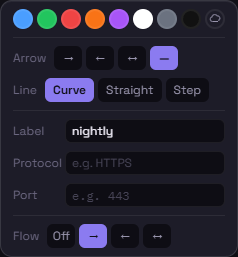
Beyond a static arrowhead, Schema can animate a stream of small dots along a connection to show which direction traffic actually flows — useful for illustrating request/response pairs, replication, or one-way monitoring taps.
Turning it on
Section titled “Turning it on”Select a connection and use the Flow row in the color toolbar:
| Option | Effect |
|---|---|
| Off | No animation (default) |
| → | Dots flow toward the node you connected to |
| ← | Dots flow back toward the node you connected from |
| ↔ | Two interleaved streams, one in each direction — good for showing a two-way conversation (e.g. a web server talking to an app server) |
Direction here is normalized to what you’d visually expect — → always animates toward whichever node is further right (or further down, for a vertical connection), regardless of which node you happened to drag from when you first drew the connection.
When to use it
Section titled “When to use it”Data flow works well for:
- Showing the direction of a request through a chain (client → load balancer → app → database)
- Marking replication direction between a primary and a backup
- Calling out a one-way monitoring or logging tap
- Illustrating a two-way conversation with ↔
It’s a visual aid only — it doesn’t feed into compliance rules or change how the connection behaves otherwise.